The TwinQ APIs are secured with the OAuth 2 protocol, where access can be obtained with an authorization token. To use this, you first need a Client ID and Client Secret. You will receive this information from us when you register.
To gain access, please contact our service desk.
With the obtained Client credentials the token can be retrieved by sending a request to our token endpoint. Replace {clientID} and {clientSecret} with the credentials you received, don't add any quotes!
OAuth token request with client credentials
  curl -i -X POST \
    -u {clientId}:{clientSecret} \
    -d "grant_type=client_credentials" \
    https://api.twinq.nl/oauth/token
JSON Response body with the token
  {
    "access_token": "AB1Cd2EFghIjKl3MN1oPQR",
    "token_type": "bearer",
    "expires_in": 3600
  }
Or in a tool like Postman with the settings below.
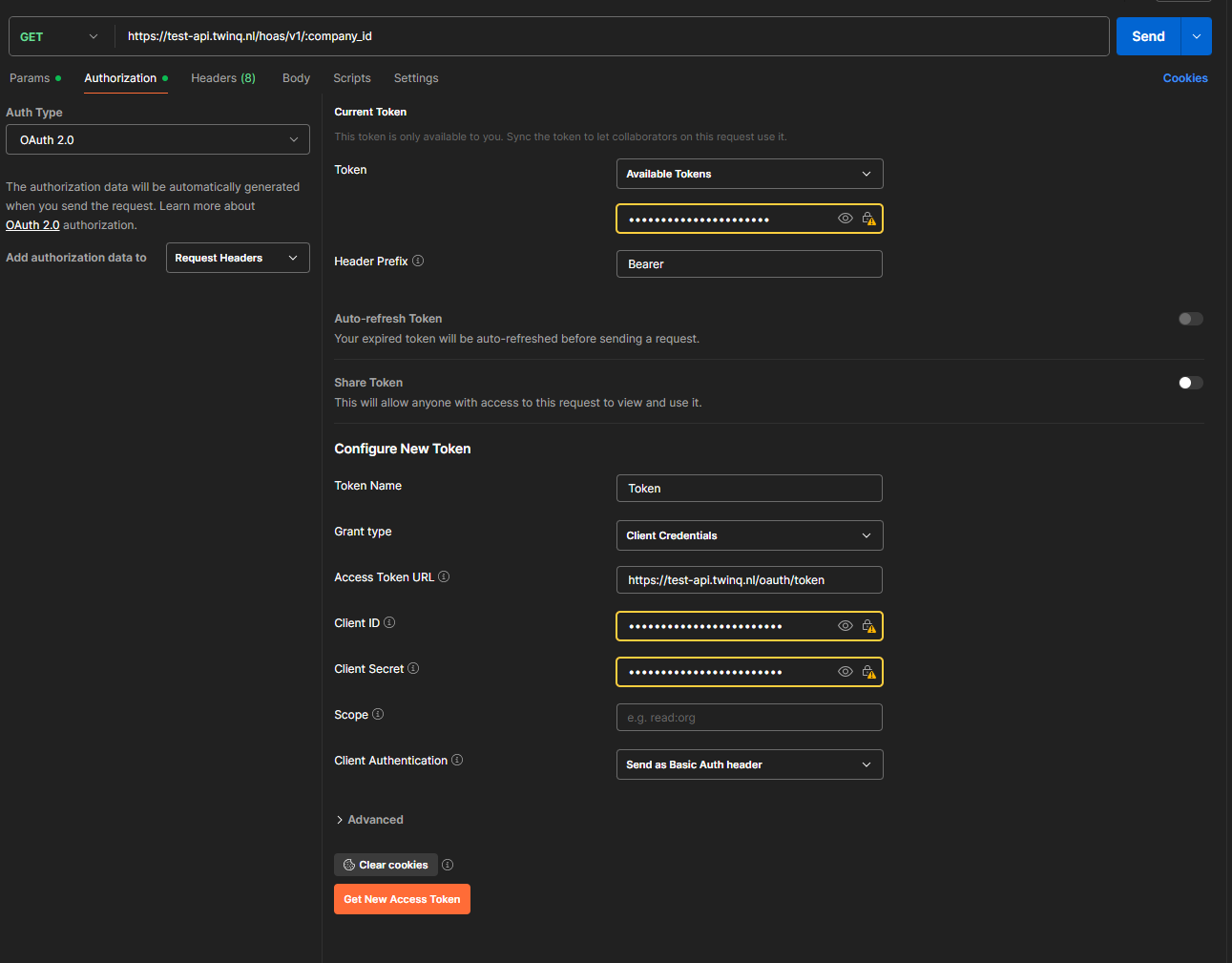
The obtained token can be used in the Authorization request header with the Bearer prefix.
Request with token in Authorization header
curl -i -X GET \
  'https://api.twinq.nl/hoas/v1/{company_id}' \
  -H 'Authorization: Bearer {access_token}'
In Postman this happens automatically if you set it up as in the screenshot above.